Dock scheduling software

Every truck. Every door.
One live board.

DockFlow replaces the spreadsheet, the phone tag, and the radio chatter with a live dock schedule your whole operation runs on — from the office to the warehouse wall.

Scroll
What is DockFlow

The schedule your dock actually follows.

Most docks still run on a shared spreadsheet, a wall calendar, and someone's memory. Trucks stack up at 8 AM, doors sit empty at 2 PM, and nobody finds out about the reefer until it's idling in the yard.

DockFlow puts every appointment on a live board — organized by door, by time, and by status, from scheduled to checked in to complete. Carriers request their own slots, schedulers approve with one click, and the wall-mounted TV board keeps the floor in sync all day.

No installs, no IT project, no training week. It runs in the browser you already have.

0
Schedule views
day · week · month · list
0
Built-in roles
admin · scheduler · driver
0
Status stages
request → complete
0
Click to approve
carrier requests
Product tour

Built around the board.

Real screens from DockFlow — not mockups.

01 / THE DOCK GRID

See every door, every slot, at a glance.

Columns are doors, rows are time slots. Inbound is blue, outbound is violet, and status is always visible — checked in, in progress, complete. Click any empty slot to book it; DockFlow flags overlapping appointments before you double-book a door.
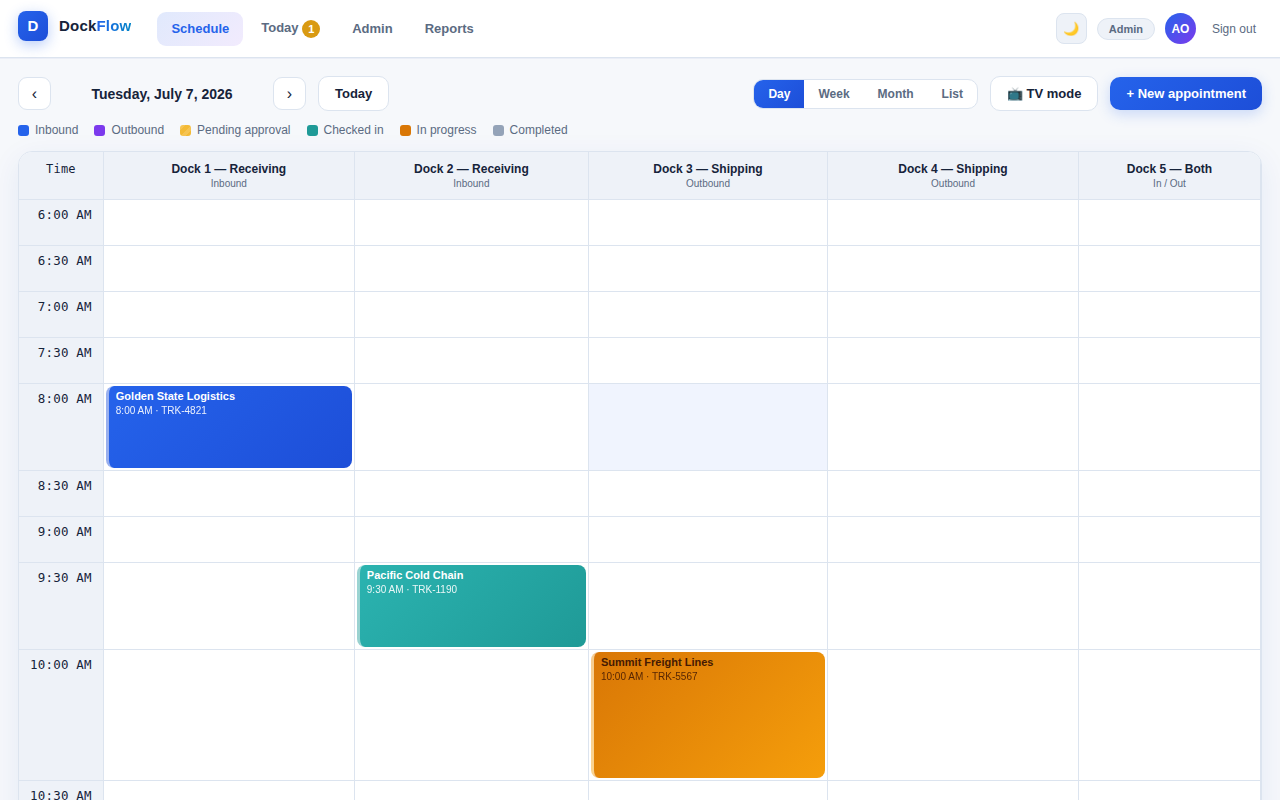
DockFlow day view dock grid
02 / SELF-SERVICE + APPROVALS

Carriers book themselves. You stay in control.

Drivers and carriers get their own login and request slots directly — no phone calls, no email chains. Requests land on your Today dashboard as pending, and one click approves or declines them.

  • Morning-briefing KPIs: inbound, outbound, on site, completed
  • Pending requests surfaced front and center
  • Role-based access for admins, schedulers, and drivers
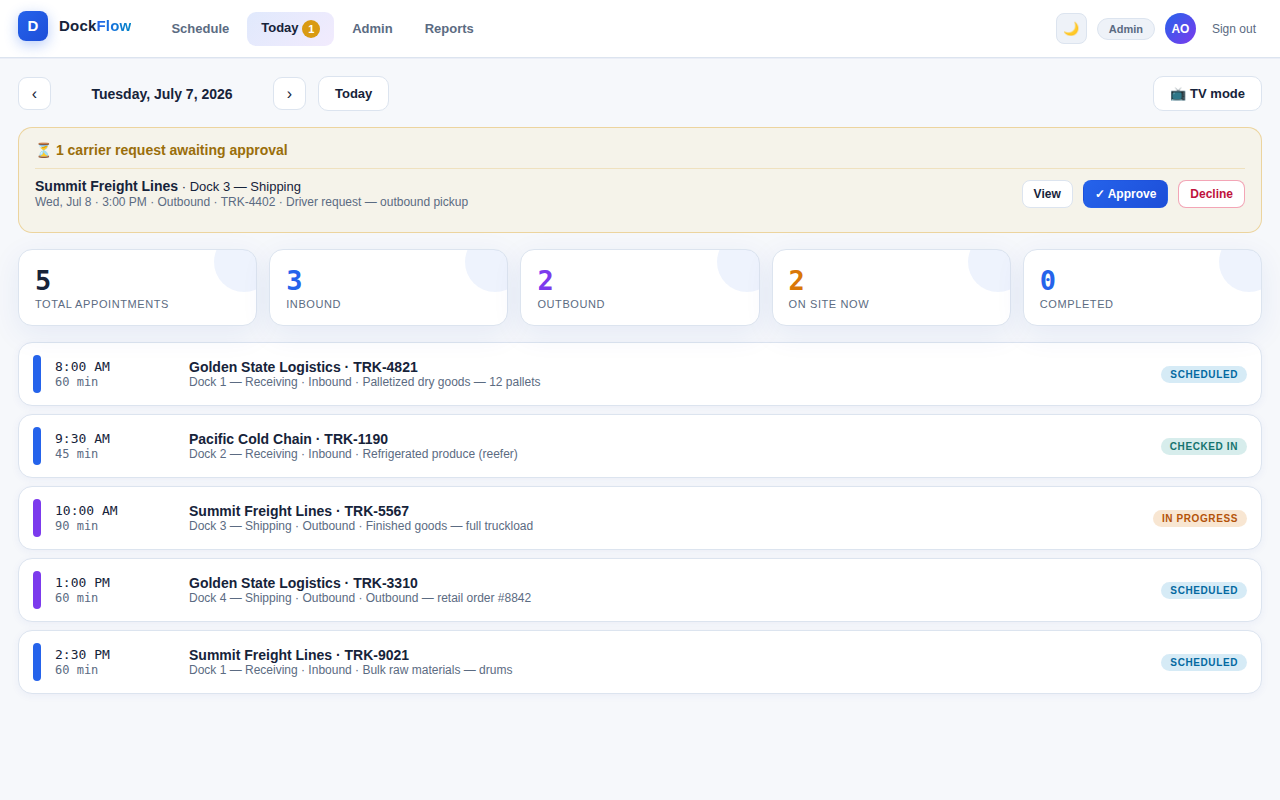
DockFlow Today dashboard with pending carrier approval
03 / ZOOM OUT

Week and month views for planning ahead.

Flip to the week to balance load across doors, or to the month to spot your heavy days before they happen — every busy day carries a booking count badge.
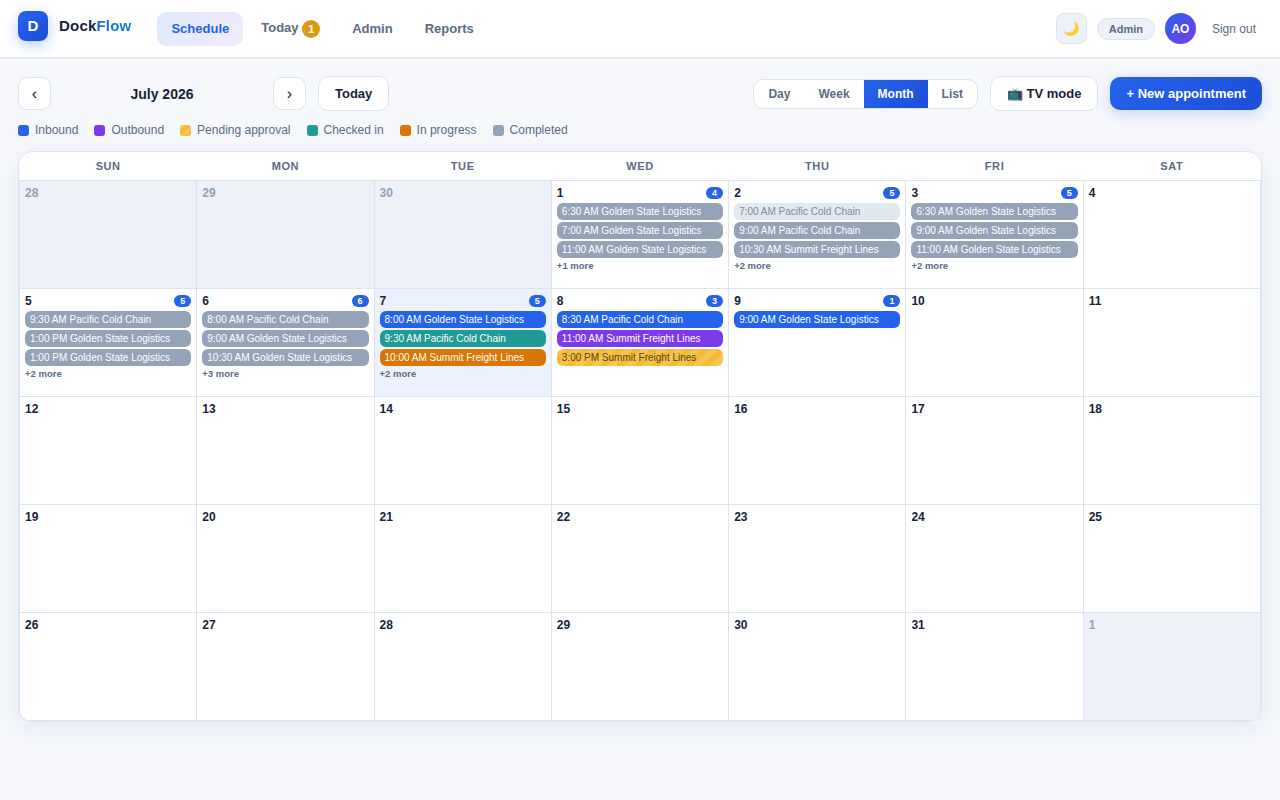
DockFlow month view with booking density
04 / PROOF, NOT VIBES

Reports that write themselves.

Every booking becomes data: carrier performance, dock utilization, completion and cancellation rates, peak arrival hours, daily volume. Filter any date range and export every table to CSV in one click.
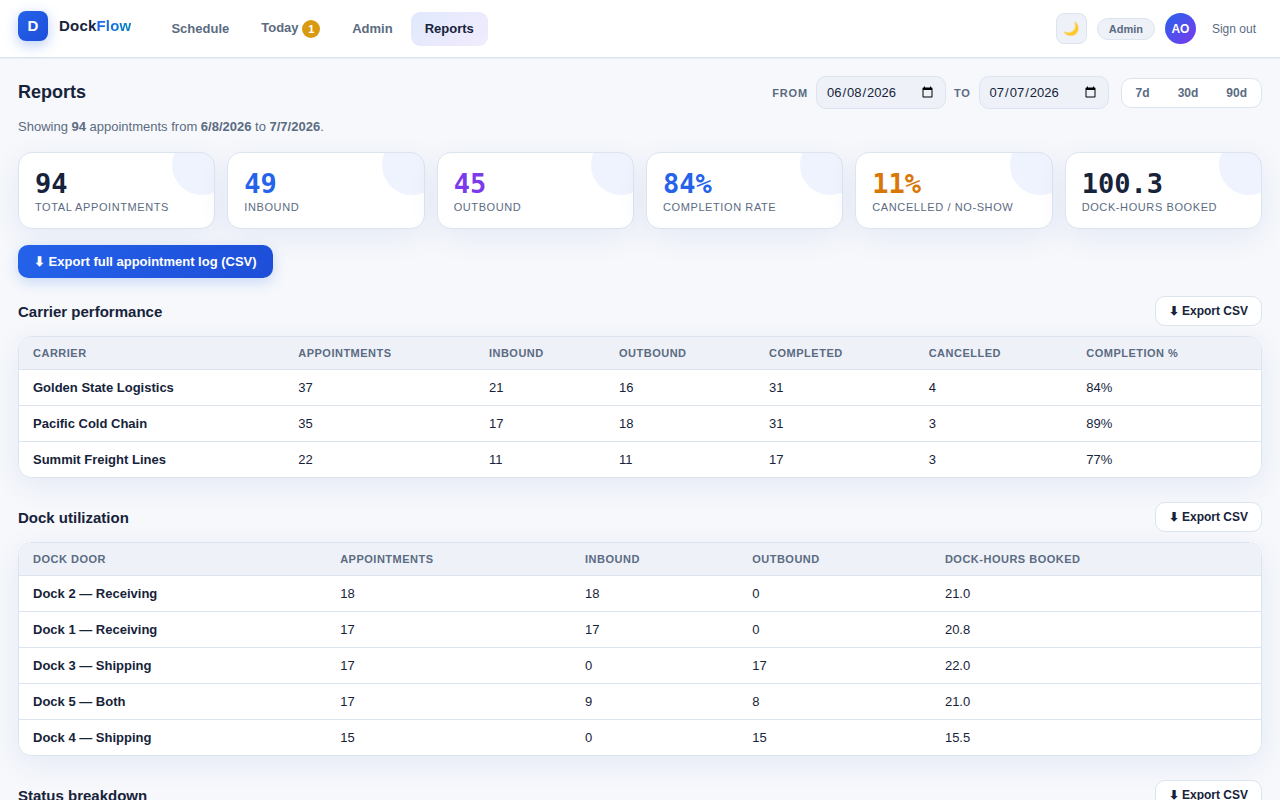
DockFlow reports with carrier performance and dock utilization
Night shift approved

From the office to the wall.

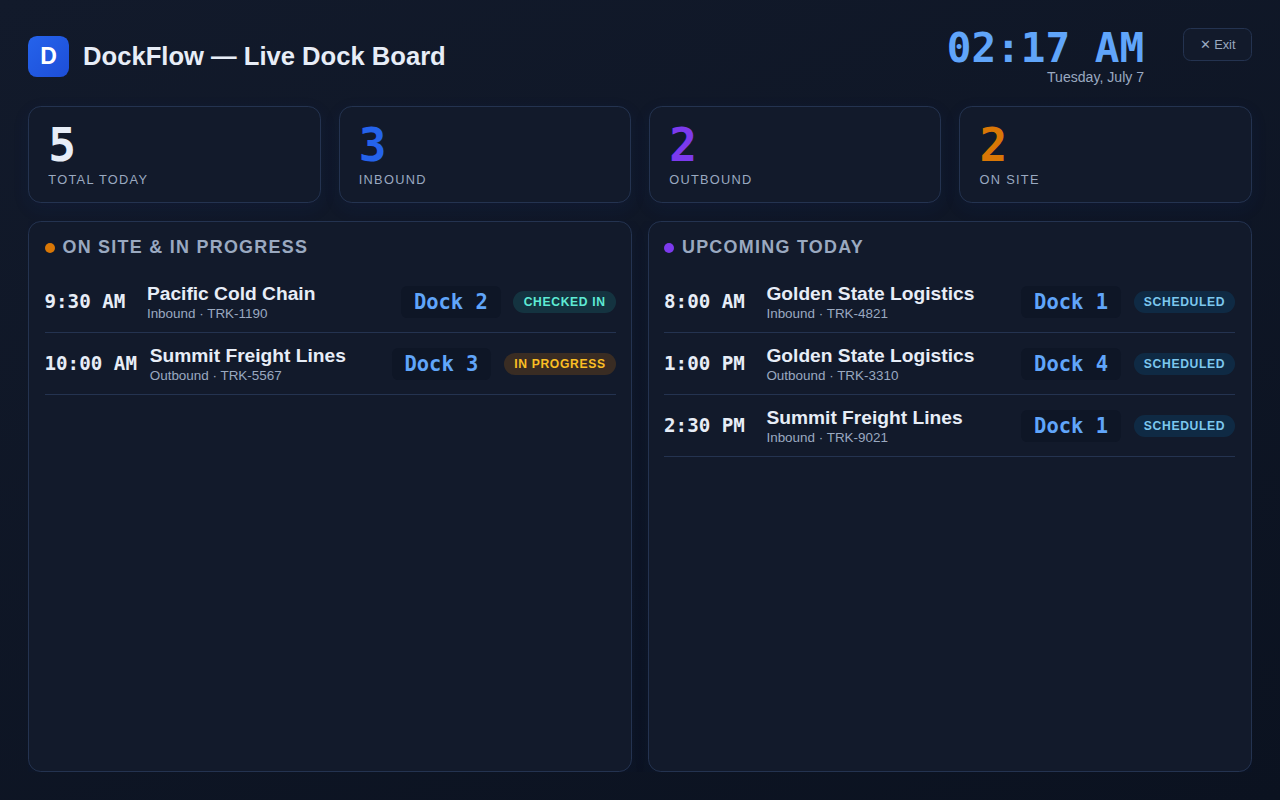
A full dark mode for control rooms and late shifts — plus a TV mode that turns any wall screen into a live dock board: who's on site, who's up next, refreshing automatically.

DockFlow TV mode live dock board
TV MODE — Live wall board, updates every 15 seconds
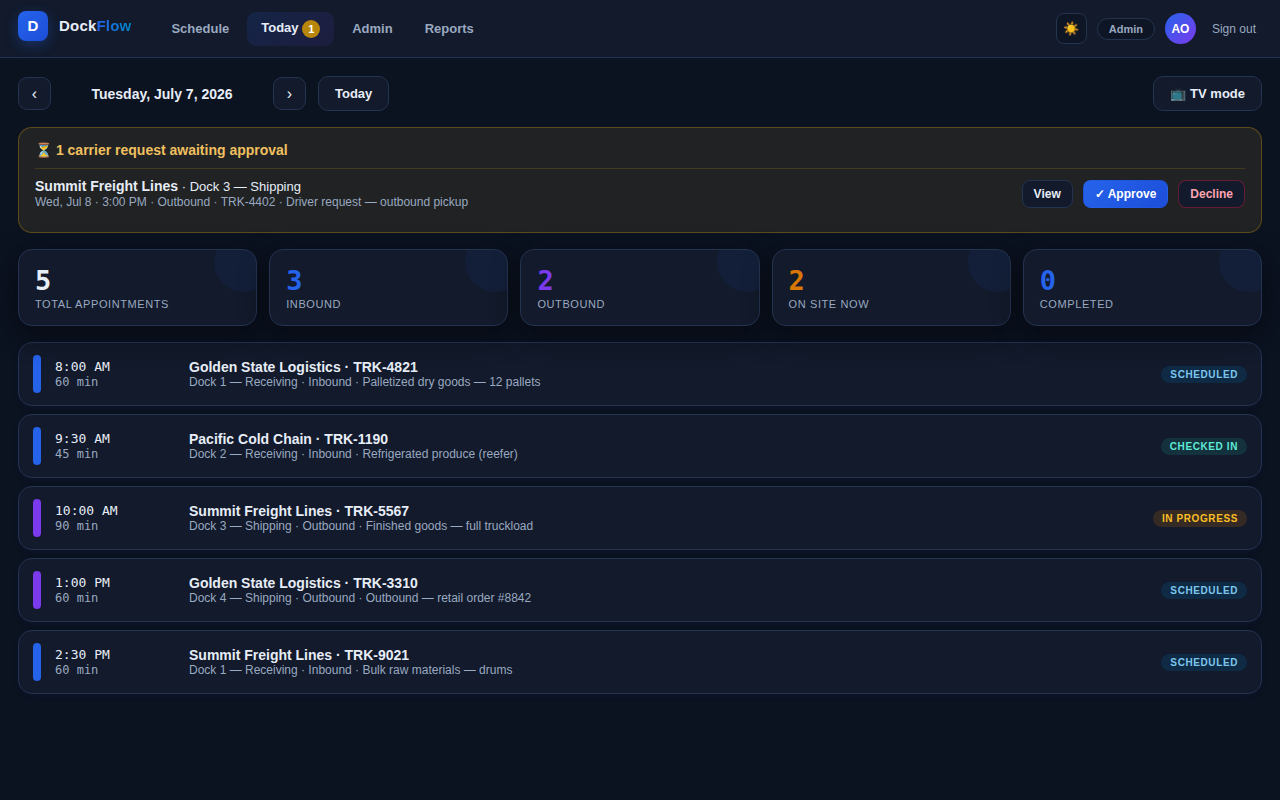
DockFlow dark mode Today dashboard
DARK MODE — One click, every screen, remembered
See it in action

Watch DockFlow run a full day.

Login to live board, booking to approval to reports — the complete narrated walkthrough.

Why DockFlow

Lighter than the enterprise suites.
Smarter than the spreadsheet.

Dock scheduling shouldn't take a six-month rollout — or a shared spreadsheet and crossed fingers.

DockFlow Spreadsheets & phone calls Enterprise dock platforms
Time to first bookingMinutesInstant — chaos includedWeeks of onboarding
Carrier self-service with approval flow Built inOften a paid add-on
Live TV wall board Built inRarely included
Double-booking protection AutomaticManual vigilance
Day · week · month dock viewsOne messy tab
Reports & one-click CSV export Built inCopy & paste
Dark mode & wall-screen readyRare
Runs in any browser, nothing to installSort ofHeavy portals & logins
PricingSimple & flat"Free" — paid in dwell timePer-door enterprise contracts

Comparison reflects typical patterns across common approaches to dock scheduling; individual products vary.

Everything in the box

Small footprint. Full toolkit.

Live dock grid

Doors across, time down. Book any open slot with a click; conflicts get flagged before they happen.

Inbound & outbound

Color-coded directions per door — receiving, shipping, or both — so the yard always knows where to send a truck.

Approval workflow

Carrier requests queue up as pending. Approve or decline in one click; status updates everywhere instantly.

Six-stage status

Pending, scheduled, checked in, in progress, completed, cancelled — the whole lifecycle at a glance.

👥

Roles & permissions

Admins configure, schedulers manage the board, drivers see only their carrier's appointments.

📺

TV mode

A wall-ready live board with clock, KPIs, on-site trucks and what's up next. Auto-refreshing all shift.

📊

Reports & CSV

Carrier performance, dock utilization, peak hours, daily volume — filter by range, export in one click.

Dark mode

A full dark theme across every screen, one click away, remembered between sessions.

Put your dock on schedule.

See DockFlow running on your doors, your carriers, and your hours — in a 20-minute walkthrough. Tell us a little about your dock and we'll reach out to schedule it.

We'll only use this to schedule your walkthrough. No newsletters, no spam.